In the digital age, data storage, security, and accessibility have become critical for both individuals and businesses. Synology, a leading brand in network-attached storage (NAS) solutions, offers powerful, user-friendly, and secure devices that simplify data management. Whether you're looking for personal cloud storage, a multimedia server, or an enterprise-level backup solution, Synology NAS provides flexibility and performance to meet diverse needs.
In this article, we’ll explore what Synology NAS is, its key features, benefits, and how it can transform your data management experience.
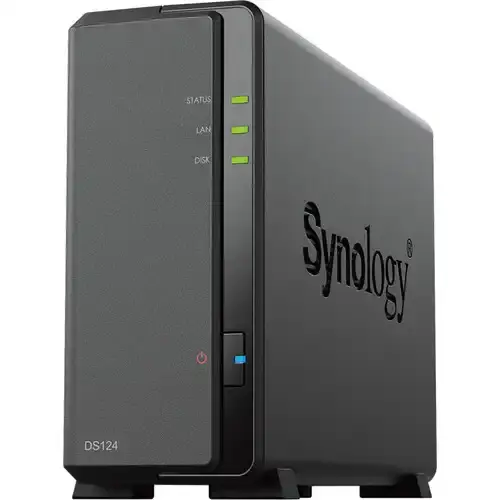
A Network-Attached Storage (NAS) device is a dedicated file storage system that connects to a network, allowing multiple users and devices to access and manage data efficiently. Synology NAS stands out due to its intuitive DiskStation Manager (DSM) software, robust security, and extensive feature set.
Unlike traditional external hard drives, which require direct connections to a computer, NAS enables remote access, automated backups, media streaming, virtualization support, and much more.
Synology's DiskStation Manager (DSM) is a Linux-based operating system that provides an easy-to-use web interface for managing files, security, applications, and network settings. DSM enhances the user experience by offering:
✅ Drag-and-drop file management
✅ Multi-user access with permission control
✅ Advanced data protection and security features
With Synology NAS, you can store and access files from anywhere, making it a perfect solution for personal and business use. Key benefits include:
🔹 Automated backups – Schedule regular backups for PCs, Macs, and external drives.
🔹 Cross-device synchronization – Access your data seamlessly from desktops, laptops, and mobile devices.
🔹 RAID support – Protect against hard drive failures with RAID 1, 5, 6, or 10 configurations.
Synology Drive allows users to create their own private cloud storage, eliminating the need for third-party services like Google Drive or Dropbox. This ensures:
✔ Full control over your data
✔ No subscription fees
✔ Secure file sharing with customizable permissions
Turn your NAS into a powerful media server with apps like Plex, Video Station, Audio Station, and Photo Station. Stream music, movies, and photos to smart TVs, game consoles, and mobile devices.
Synology provides a suite of mobile apps, including:
📱 DS File – Access and manage files remotely.
📱 DS Video – Stream movies from your NAS.
📱 DS Audio – Play your personal music collection anywhere.
📱 DS Cam – Monitor your security cameras with Surveillance Station.
Security is a priority for Synology, offering features like:
🔐 AES-256 encryption – Protects sensitive files.
🔐 2FA (Two-Factor Authentication) – Enhances account security.
🔐 Snapshot Replication – Prevents data loss from ransomware attacks.
🔐 Firewall & IP blocking – Secures against unauthorized access.
For businesses, Synology NAS offers enterprise-grade solutions:
💼 Virtual Machine Manager (VMM) – Run Windows, Linux, or macOS virtual machines.
💼 Active Backup for Business – Centralized backup for servers, PCs, and cloud services.
💼 Docker & Kubernetes support – Deploy and manage containerized applications.
| Feature | Benefit |
|---|---|
| User-Friendly Interface | Easy to set up and manage, even for beginners. |
| Expandable Storage | Supports multiple hard drives and external expansion units. |
| Multi-User Access | Perfect for families, businesses, and teams. |
| Cost-Effective | No monthly cloud storage fees. |
| High Performance | Handles 4K streaming, backups, and virtual machines efficiently. |
1️⃣ Choose the Right NAS – Select a model based on your storage and performance needs.
2️⃣ Install Hard Drives – Insert compatible HDDs or SSDs into the NAS bays.
3️⃣ Connect to Network – Use an Ethernet cable to connect the NAS to your router.
4️⃣ Set Up DSM – Access DSM via a web browser and configure storage, user accounts, and security settings.
5️⃣ Install Apps & Services – Customize your NAS with backup tools, media servers, and cloud sync options.
Synology NAS is a game-changer in data storage, offering robust security, media streaming, cloud synchronization, and business-level solutions in one compact device. Whether you’re a home user looking for a personal cloud or a business needing enterprise-grade storage, Synology NAS provides a reliable, scalable, and cost-effective solution.


In today's digital age, technology is evolving rapidly, and compact, robust devices like Raspberry Pi have...
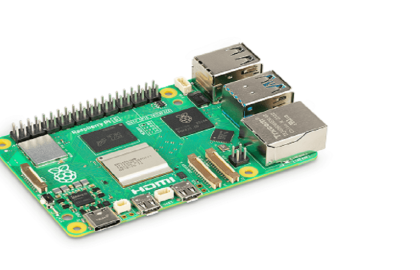
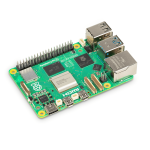
Raspberry Pi is a compact, affordable, and powerful single-board computer designed by the Raspberry Pi Foundation....

Flipper Zero is a portable, multi-functional cybersecurity tool designed for hacking, testing, and hardware exploration. This...